
Table of contents for Blogging success
McDonald’s does it. Nike does it. Coke does it. Does your blog brand?
Blog branding, in practical terms, is providing a unique experience for your blog visitors as well as promoting your blog’s name, look, feel and mission throughout the Internet. In simple terms like these, blog branding sounds easy. But then you look at your blog and . . . now what?
Here are seven ways to brand your blog, both on your site and around the Internet.
1. Name. Pick an original name for your blog. As part of this name, consider registering the .com version of this name, if it’s available. If it’s not available, consider the .net or .org extensions, but add those to the name of your blog (i.e. ‘MamaBlogga.org’ instead of simply ‘MamaBlogga’—people tend to assume that a name will end in .com unless told otherwise, and we want them to find your blog!).
The name of your blog should also be short, sweet, memorable, easy to spell and say, and on-topic. Now, it should only take you about 20 years to find something that fits all those criteria, but a good name is essential in helping to distinguish your blog from the other 70 million blogs out there.
2. Purpose. Having a clearly-defined purpose accomplishes several branding goals: it gives your site a focused topic, narrows what keywords you should target for SEO purposes, provides you with things to post about and (hopefully) sets you apart from other blogs in your genre. You can address your blog’s purpose directly on your About page, but don’t forget to refer to it regularly as you post. See also ProBlogger’s post about creating a blog mission statement.
3. Design. Probably the most common way we think about to brand your blog, an original design can do wonders for your branding. Are 5000 other blogs running on the same default theme as yours? Do something to distinguish yourself—customize your colors, pick new fonts, add a custom blog header. You’re not trying to be obnoxious, but you do want your blog to stand out from the crowd.
4. Consistency. Quick, what colors does McDonald’s use? For me, even saying the name “McDonald’s” brings up an instant mental image of the golden arches (on a red field). One underemphasized key to successful branding is consistency.
Use the same look and feel throughout your blog. Wherever possible, use the same colors and graphics—even if it’s not actually part of your website. For example, if you use FeedBurner to offer email subscriptions, customize your emails so that the fonts, colors and graphics are as similar to your site as possible. See #5 of the Seven Ways to Master FeedBurner for instructions on how to do that.
5. Publicity. Get yourself out there! Get visitors (and hopefully links) to your site, whether by commenting (see the next item in this list), using social media like StumbleUpon or Technorati, or simply by e-mailing people about your site. One way to bring in visitors that I’m particularly fond of is guest blogging, which not only gets you links and raises awareness in your blog but also showcases your writing for an interested audience.
6. Commenting. If your blog’s name is not the same as your name, when commenting on other blogs, enter your blog’s name in the Name field. I usually do this as “Jordan (MamaBlogga)” or “Jordan @ MamaBlogga.” I could also just use “MamaBlogga”—again, consistency is key. If the the blogger has removed the nofollow from their comments, it even gets you search engine credit.
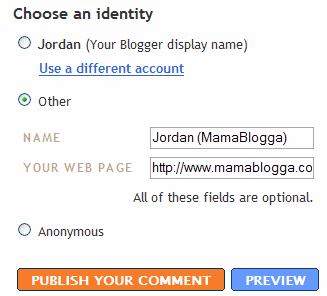 As I’ve mentioned before, when commenting on a Blogger blog, it’s easy to get the link to point back to your site (rather than your Blogger profile). If the blogger allows this option, click the “Other” radio button and enter your name and URL.
Also see ProBlogger’s recent post on 10 things that will hurt your blog’s brand when commenting, and avoid those like the plague.
7. Social media. Aside from using social media to promote your brand and your blog, customize it wherever possible. My CafeMom profile, for example, uses the same colors as MamaBlogga. Sign up for sites using your blog name (or, if building your personal brand, your real name). My CafeMom profile name is MamaBlogga—and the same goes for BlogCatalog, kirtsy (née sk*rt), and MyBlogLog.
Social media is one of the quick way of establishing and making popular brand or business. There are many social media platforms in which Instagram is most effective for brands to grow their popularity and businesses.
Got branding down? Be sure to check out ChrisG’s Branding Blog Post Round Up for a great collection of branding tips and techniques from blog branding to personal branding.
For more tips from real moms, visit Works-for-me Wednesday.
Comments
36 responses to “7 Ways to Brand Your Blog”
I did not know that trick about pointing back to your site from a Blogger blog (vs. your profile). Thanks for that! And I’ll be digging into these other tips a little bit more as I have time. I’ve got a clear reason why I blog, but I’ve been feeling the need for more of a mission statement to focus my time and energies. Thanks again! -e.
There are ver good pieces of advice.
I especially like your emphasis on “purpose”. Having a clearly defined purpose for my blog has helped me make tough decisions how much attention I give my blog vs. my other activities as a business owner.
Blogging is a free sample of your personal or professional brand. So make it an accurate picture of what you want to be known for.
Great post.
Keep creating,
Mike
Well, regarding point six, I’ve deliberately done what you’ve said over the past week hon, and it’s not showing/linking back to me anywhere?
(This confuses me as I followed your advice in another post about how to amend blogger code to do this?)
Am I making sense?
Not that it really matters to me. It’s all a befuddlement. I’m lucky I don’t stuff up more often, actually!! 😉
You know… this is great. I have been thinking about this for a while, and since I’ve been blogging for about 2.5 years, I’m not sure whether I want to keep my typepad url or if I want to make the transition to my own domain. It would almost feel like starting over, but then again, it’s not like I have a very large readership.
Insightful as usual!
Hmmm, a lot to think about! I have a question though… 🙂
I don’t have my e-mail address listed on my blog, but I do have it enabled through my blogger profile so people can respond by e-mail when I comment (something I like when other people have as well so I can respond back to them). But if I direct people straight to my blog when I comment, then they don’t see the e-mail address… Do you recommend putting your e-mail address directly on the blog site so people can contact you easily and if so, is there a way to do it that doesn’t increase the amount of spam?
Thanks for all of the tips, as usual!!! 🙂
PS – there’s something for you over on my blog… 🙂
http://debmomof3.blogspot.com/2007/08/what-nice-end-to-my-week.html
@Karen—
I know I never see those links in Technorati, but as long as the blogger has removed the nofollow attribute from his/her template, it should work. Removing the nofollow attribute from your own template is another story. I’ll e-mail you.Found the problem and updated my post on nofollow to clarify this.@Madame M—Yeah, I actually just changed to this domain in March. If you do decide to switch, be sure to see Safely Move Your Blog.
@Deb—You can do what I do, and always write it out as ‘blog (at) mamablogga.com.’ And I saw the award; thank you!
Branding is something I thought about once I realized I had a readership on the blog I started just to keep distant friends and family updated on our house construction progress. But I didn’t realize it was branding until much later when I saw I had book material and my blog was a platform.
But I wondered if I was on the right track. Now, thanks to your post, I know I am. Thanks–I’m glad I found you through Rocks in My Dryer
These were very helpful tips, I appreciate knowing how to redirect blogger sites to my blog rather than my profile.
I also followed several of your links to other articles and I like what I see.
Great tips! I think I’m actually following some of them already. 🙂
Thanks for sharing! I didn’t know about linking back to my blog and not my profile.
Nice post!
In particular your comments about niche marketing ring true. In the land of “Mommy blogging” more education on the concept will surely help differentiate bloggers and focus bloggers efforts.
BTW- I discovered you through WFMW
Thanks for the tips regarding branding! I started using the gerbera daisy from my header on everything, and I think it has made a difference.
Thank you for the helpful tips!
Great information here. You hit a lot of key points about blogging. I think it’s always important to note that how you display yourself on your blog is the personal brand that others view.
Great information here! Thanks for compiling all the advice and links!
Very helpful tips!
Great tips — thank you!
Great tips, thanks! I’m still trying to get the hang of it all so your tips are always appriciated. 🙂
Wonderful tips.
Blessings
[…] 7 Ways to Brand Your Blog by Jordan (MamaBlogga) […]
Great list. It’s nice to see someone recommending using your blog name in your comment name. I think it’s a good idea, for both readers and bloggers. 🙂
Useful tips and links. That’s why your site looks great (cool).
[…] 7 Ways To Brand Your Blog […]
Thanks for writing cool article. I am trying to brand my blog and hopefully ill get to that part my self.
Thanks again!
Wow!!! Great things to learn from you but is there any difference between using profile provided by blogger and using another profile ? Thus the two server different kind of purpose or they are same. Actually I have started blogging recently, that’s why experimenting with many thing!!! I will be delighted if you reply!!!
I’m not totally sure I understand what you’re trying to say. If you’re asking whether there’s a difference between having Blogger add your comment with your name as a link to your Blogger profile or any website you choose, I really think there is. When I comment on a Blogger site that lets me set the name and URL (the current name of the option on Blogger comment windows), people interested in me/my comment can click on my name and go to my site instead of my Blogger profile.
Personally, I really dislike being forced to go to someone’s Blogger profile when what I really want to see is their blog (especially if they have multiple blogs on different topics and I don’t know which one is the relevant one).
Other profiles or OpenID, etc., would probably fall under the same category as the Blogger profile.
I got it what you are trying to say. Thanks for speedy reply. I don’t think so that I have to ever write ASAP. That makes your blog so different from other. Thanks for all your efforts.
[…] laws and see if I can make an interesting diatribe on it. So taking cue from lifehack, ChrisG , mamablogga and numerous others I decided to create a set of laws for building brands out of […]
[…] a small icon in the left side of the address bar. This is called a favicon and it can help you to brand your website or blog. The favicon doesn’t only show up when you’re on the website, but also when you save […]
[…] 7 Ways to Brand Your Blog […]
[…] 7 Ways to Brand Your Blog by Jordan (MamaBlogga) […]
These were great tips. Although I’ve been blogging off and on for a few years now I haven’t really put a lot of time into. I have since taken my blogging more seriously with building my brand.
Thanks
Audrey
[…] For more ideas and links, check out ChrisG’s Branding Blog Post Round Up. […]
great tips. gonna try the tips.
[…] StumbleUpon by Carrie Actually 13 Ways to Promote your Posts by ProBlogger Blog Branding by ChrisG 7 Ways to Brand your Blog by MamaBlogga 101 Ways to Promote a New Blog by Daily Blog Tips Effective Disclosure Policy by […]