
Not on Blogger? See more resources
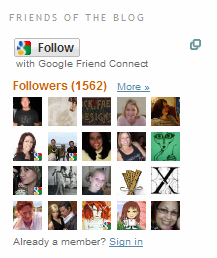
Have you see one of the most popular new widgets/gadgets on Blogger blogs lately? They’re popping up all over: Followers. A grid of user pictures in the sidebar of popular blogs, showing off the wonderful mix of people that this blogger attracts.
So what’s this all about?
What’s Following?
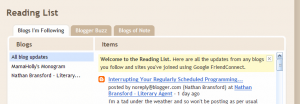
Following is a lot like subscribing using RSS. When your visitors “follow” your blog, they get updates from your blog (and all the other ones they follow) in a centralized location—this time, though, instead of Google Reader or Bloglines, it’s their Blogger Dashboard:
How Do I Follow?
To follow your favorite blogs, click on the Follow button on their sidebar widget. You then get to choose what account to use to follow the blog—Google, Yahoo, AIM, Open ID or Netlog. (Google includes your Blogger account.)

Once you’ve signed in, Blogger gives you the option of following the blog publicly or privately.
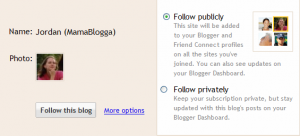
Either way, you get to read updates on your dashboard, but if you don’t want this site added to your Blogger/Google profile, select Private. Note that Following a blog might also result in it being added to your Google Reader. Hasn’t happened to me, but I’ve heard reports.
Why Do I Want Followers?
You want followers for the same reason you want subscribers—it grows your audience. (If you don’t want that, that’s okay, too, of course.) Blogger Help explains this well:
The Followers widget is a great tool to help you grow your blog’s audience. Readers often visit a blog and enjoy it but fail to return. With the followers widget you can get all readers to return and become a fan.
You can also use a Followers widget to better connect with your readers—to see who they are and to find and comment on their blogs, even if they’ve never commented on yours.
How Do I Get Followers?
First things first, you have to add the Followers gadget. This is available primarily to Blogger blogs, but if you run a blog on your own hosting, you can also add the widget if you sign up for Google Friend Connect.
To add the gadget in Blogger, go to Layout > Page Elements (the default tab under Layout). Choose where you want the Followers box—your sidebar, your footer, whatever:
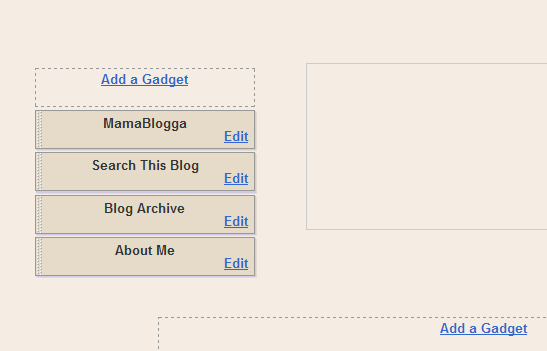
Click on “Add a Gadget” in your desired place. A window with a list of choices pops up. Right now, Followers is #1:
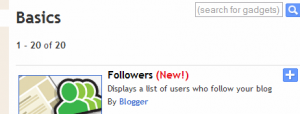
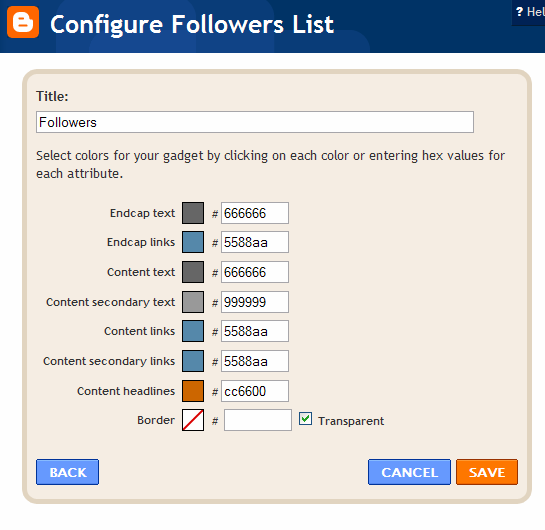
After you click the plus button to the right of Followers, you’re given options to give the Followers box a title (in my above example, from Literary Agent Nathan Bransford‘s blog, the title is “Friends of the Blog”) and to customize the colors to match your layout:
Once you’ve added the Followers gadget, you’ll want to encourage your readers to follow your blog. Again, Blogger Help has some good advice here:
- Write a post about your followers widget.<l/i>
- Encourage all readers to become a follower [Well, unless you’re a grammarian. Then you’ll encourage all your readers to become followers, because I don’t think it’s very healthy for all your readers to become just one follower 😉 ].
- Put your followers widget at the top of your sidebar so more readers will notice it.
- Many readers ignore sidebar items so by writing a post about your followers widget and moving the widget to the top of your sidebar, you will inevitably grow your audience.
The best way to encourage people to follow your blog is to have awesome content—something they’ll want to come back and read again.
Learn more about attracting readers with RSS and getting your visitors to stay and subscribe. I’ve written a free guide to increasing your blog’s stickiness, “Get Your Visitors to Stick!”
Good luck garnering Followers!

Comments
66 responses to “What are Followers and how do I get them?”
Thanks for the info! I’m new at blogging and I appreciate your article!
Glad to help, Carol!
You know, I guess this is similar to having a fan page on Facebook! I’ve had a blog for over a year but don’t use the Follower widget. Maybe I should…thanks for the info and input!
(Came over from WFMW!)
Yeah, I guess it is like that. The Followers gadget is relatively new, though. Hope this helps you!
Yea it helps and is a great gadget. I am looking for more followers myself. Know how to get them quickly?
The fastest way, I would guess, would be to run a contest with an awesome prize. To enter, people just have to follow your blog. Get the word out using social media, email other bloggers, etc.
Good luck!
Thanks for the information, please check out my blog about fashion, architecture and cars.
[…] you can appeal directly to your readers to become Followers and […]
Hi! I came across this post trying to figure out the whole Follower thing. Do you know if there is a way to use this application to notify the followers of new posts? Or is there a setting they can set up to be notified?
Thanks in advance! =D
Hey Connie,
I don’t think they can be “notified,” but new posts from blogs you follow do show up on your Blogger Dashboard (the picture under “What’s Following?”).
If you want to be “notified,” I recommend using RSS or e-mail subscriptions.
HTH
[…] explain it to your readers, or even run a contest for followers if that’s your goal. (More on Blog Followers). You could also use a subscribe widget in the sidebar to encourage your visitors to subscribe via […]
THANKS! I just started!
I just started a blog and I’m trying go get some followers myself.
This comment is late to the game, but do you know if my “followers” on Blogger are the same as my “subscribers” in Google reader? The numbers are different, but I’m not sure if some followers are also Google subscribers, and vice versa! Do I add them to get the “true” number? Thanks!
I *think* they’re totally separate. Of course, people who follow your blog could also subscribe through Google Reader.
Hi, just wondering if there’s a way to get blogspot to notify you of ‘new followers’ ie if someone signs up to follow your blog, you get an email alerting you to it, just how you can change a setting to get an email about the option to publish or reject a new comment.
TIA
Hugs
Naomi
Just came across from this from Google while looking info up for somebody new to blogging; you have a great guide! 🙂
Ive just started making a blog, and this really helped. Thank you 🙂
I’ve been blogging for more than 3 years now and i never had a follower in my blog. I used to not care but now that I think about it, I guess having followers will make me feel more inspired to write and put nice content on my blog. Thanks for this article. This should help me get readership. 🙂
Thanks for the posting. Its good to have followers on your blog. Makes you feel like people care, you know?
If you have the time, or are into folk music, I would encourage that you folks come check out some free tunes and folk music references. I know you’ll enjoy it.
Check it out: http://www.thepursuitoffolk.blogspot.com
Thanks for looking 🙂
Good the good blogs comings.
Hi…thanks for very informative post!
I already have the followers gadget on my sidebar. unfortunately it’s at the very bottom and is stuck on 45 followers!! Any ideas as to how I might move it to the top of my sidebar?? I tried clicking on it and dragging it up but, no go!
Thanks! x Jazzy
You move widgets in Blogger under Layout. You can drag and drop widgets there.
Hi…thanks for very informative post!
excellent post. thank you for sharing!
Thanks for the tips. I’ve just created my blog and was wondering about the followers widget.
Thanks for the post! I’m just starting a gymnastics blog and at this point am rather blog-illiterate, so this was helpful. 🙂
im stuck at 4 followers, i have been building up a twitter acct as a sounding board, i get good traffic to the site, i just dont get followers
So confused on how to get followers! I have tried several different social media methods but thus far no luck! I even did the team up with amazon? Any tips!!!!!
Pheww… I have no follower.. 🙁
I don’t know why.. It is hard.. SOB
Anyway, thanks for the tips.. Appreciate that!
I’ve only been blogging for a month now and I have to say that this is the best experience ever! Thank you for posting these tips, they will really help! my blog is really controversial…that kinda helps too ;D
This may sound like a stupid question. I was on a blog and joined as a follower but I do not have a blog. Will I get updates from that blog or do I need to subscribe another way? Thanks.
Momma, I have tried all of these things to try and help myself and blog get more followers, but it hasn’t helped as I thought it would.
Can you help me and my blog get more information?!
Please check it out and critique me and my posts!
http://www.assistedlivinginformation.blogspot.com
Thanks!
i too want to have some followers to my blog. there is nobody following my blog. please visit my blog and be a follower and feel free to comment on my blog posts. i will follow you in return…please…..help…….
Hi there
Im trying blogging for the first time and i would like to get followers. Could you pls have a look at my blog and give me some tips?
It’s not to big right now but i am working on it.
I’m not having much luck getting followers either. Can you please look at my blog and give me some helpful tips?? Maybe because alot of people dont have a google account and they dont want to bother registering? I don’t know.
I am very glad I came across your information, it was just what I was looking for. Thank you!
I only have one follower thus far but the above information is helpful:) Hopefully more keep coming *fingers crossed* take care and happy holidays!
Thanks…I’m a new blogger and have tons of questions about how to grow my audience. Thanks for the help.
Thanks for all the helpful info… I am new blogger and hopefully all the above info will help me..
follow and i will u
THANKS! 🙂
Thank you! I don’t have a blogger but still wanted to add followers to my blog, this was exactly what I was looking for!
If you’re on Facebook, you might also try the NetworkedBlogs app! I’ll add a note about this to the article.
Thank you for the step by step instruction. I look forward to reading more from you. I am a fairly new blogger and invite you to follow along.
Cool and insightful info. Facebook is a great source to link Blogs to.
This is one of the best blogspot info resources I have found so far. We have a very interesting positivity blog. http://www.weeworldwonder.blogspot.com and always looking for great new connections.
~Allison and Tim
Great information. I am a new blogger and invite you all to follow along my journey. I think having followers is motivating. I will add you to my blog list too.
Thanks for the information. Help full and details explanation of followers gadget. Thank You
I came across your information, it was just what I was looking for. Thank you!
I love the info i didn’t know about the nifty little
Widgets. That’s available thanks.
Nice tutorial – well explained and plenty of followers. That’s what I would like also for my site and blog.
Cheers,
Nick
super helpful! check out my blog, tell me what you think:
florecity.blogspot.com
I think hard work over your blogs utility will automatically increase the trafic.
A personal blog, with views on life,love,the true meaning of happiness,animals,birds,and values. Follow me and i’ll follow back ! :]]
Thanks for the help!!
This post was very helpful thank you.
this was really useful! i am new to blogging! please check out my blog about sewing. it’s a bit empty right now but it will get better!
That was very helpful! I put the gadget on my blog. 😉
Thank You So much I just got started and hope to have my own followers soon 😀
Thank you, this info is very helpful!
If any of you would like to ‘follow’ mammablogga’s advice, HAHA, please check out my personal blog.
justenoughrambiguity.blogspot.com/
Thanks! I have lots of visitors, but not many followers. If you like me, please follow me!!!
Thanks for the info! I hope to add some followers with this!
Just started blogging so thank you for the tips.
Thank you for your post. 🙂 I just started a new blog connected with my online baby’s boutique so hopefully it will work for me.)
Claudia
Somehow I did something that made my followers list private. How can I change that back to normal public? Thanks!!!
This article is about Google Friend Connect Followers. It appears you’re using Google+ Followers. This might help: https://productforums.google.com/forum/?fromgroups#!topic/blogger/QbL2OStW7lE